
Change Control: Oveview
High‑Level Insights
When you open the Change Control Overview page, you're greeted with a clean, summary screen that compares your current schedule against a selected comparison schedule:
- Key KPIs — completion date shift, progress, performance index, critical-path activity count, and float — are displayed up front, each showing the net change between the two schedules
- Choose your comparison schedule via the Comparing dropdown at the top of the page (e.g., comparing against the 2nd upload).
- Jump into detail using the View / View Critical Path / View All links on each section
- Drill into a category that interests you by clicking on its bar in the Changed Activities graph at the bottom!
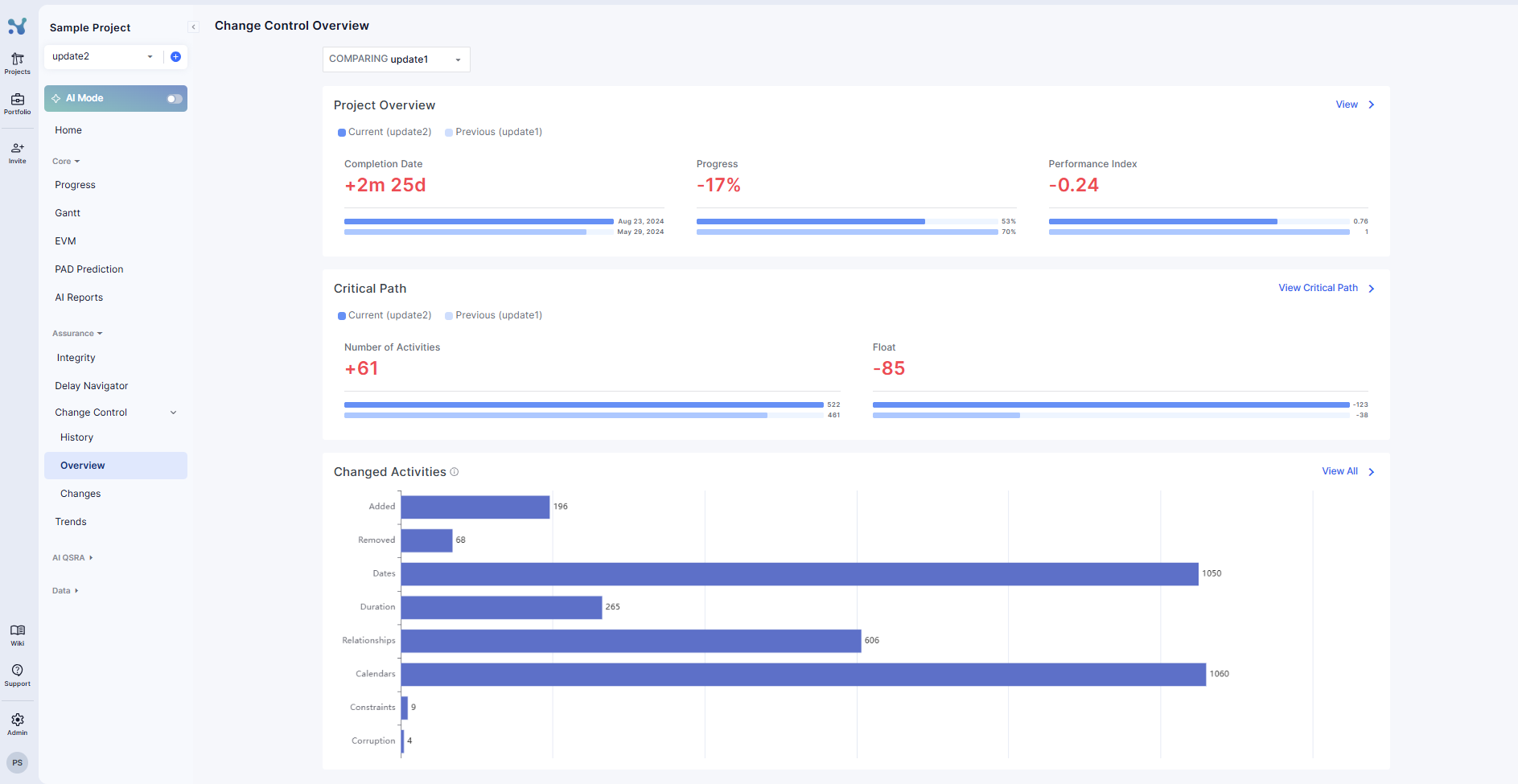
Project Overview
- Completion Date – The current end date of the schedule compared to the comparison schedule, with the net difference highlighted (e.g., +2m 25d).
- Progress – How much of the schedule has been completed relative to the comparison schedule (e.g., 53% vs 70%).
- Performance Index – Schedule performance compared to the comparison schedule. Values above 1 indicate the schedule is ahead; below 1 indicates it is behind.
Critical Path
- Number of Activities – Total activities included in the critical path, with the change shown (e.g., +61).
- Float – The amount of scheduling buffer remaining; lower float means less flexibility. The change is shown directly (e.g., −85). A decrease in float indicates the schedule has become more compressed (less buffer between activities), while an increase suggests more scheduling flexibility.
Changed Activities
A bar graph breaking down the volume of changes by category between the two schedules. Click any bar to drill into that category:
- Added – Activities added to the schedule
- Removed – Activities removed from the schedule
- Dates – Activities with changed dates
- Duration – Activities with changed durations
- Relationships – Changed relationships / logic links
- Calendars – Calendar changes
- Constraints – Constraint changes
- Corruption – Corrupted or anomalous activities detected