
Portfolio AI Training
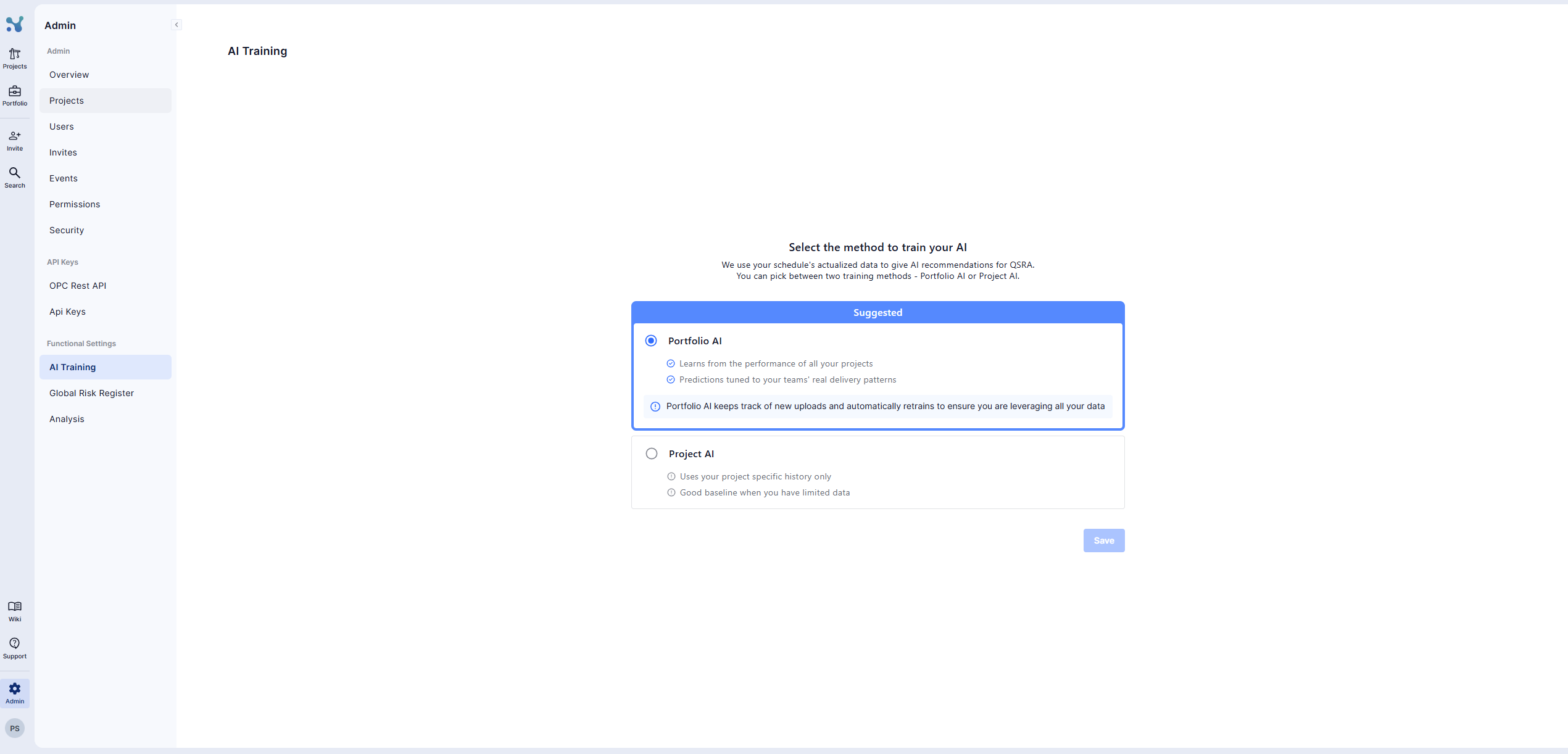
The AI Training page lets you choose which AI model is used to run AI QSRA and calculate minimum, probable, and maximum values for each of your project’s activities where AI has been activated.
You can choose between:
- Workspace AI (recommended): trained on your own portfolio data
- Project AI: based on industry-wide delivery patterns
Workspace AI (Recommended)
Workspace AI learns from how your organisation actually delivers work.
When enabled:
- QSRA results reflect your real delivery behaviour
- Activity-level min / probable / max values better match reality on site
- Uncertainty ranges improve as more portfolio data becomes available
Workspace AI is automatically kept up to date. All training and updates happen in the background.
Selecting Training Projects
By visiting the 'Configuration' page within portfolio and then clicking on 'Portfolio Scope, you can:
- Choose which projects are used to train Workspace AI
- Add or remove projects at any time
- Exclude projects you don’t want influencing QSRA results
Only actualised activities from the selected projects are used. Archived projects are never included.
Data Availability & Automatic Switching
Workspace AI automatically activates when enough portfolio data is available to produce reliable QSRA results.
When data is limited, the system safely uses Project AI instead
As your portfolio changes, the system continuously reassesses which model should be active
All switching happens automatically in the background
You can manually switch back to Project AI at any time.